OBD2 Scanner Not Connecting or Working: Find Which Side of the Link Is Failing
Published October 31, 2026
Quick answer
Most cases of an OBD2 Scanner Not Connecting or Working come down to two things: the ignition is not in the position the tool needs, or the plug is not fully seated in the 16-pin diagnostic link connector. Turn the key to ON (or press Start without the brake), reseat the connector firmly, and try again before assuming the tool is broken. If the scanner still shows no link, the next split is power: a lit screen or adapter LED means the port has 12V and the problem is communication, while no light at all points to the port fuse, the wiring or the tool's cable.
Table of contents14 sections · tap to expand
Key takeaways
- A powered screen with a link error and a dark screen are two different faults, and the power test tells you which one you have in under a minute.
- Isolate the sides with two swaps: the same tool on a second car, and a known-good tool on the same car.
- A working connection can still show no ABS, airbag or transmission data because an engine-only code reader cannot see those modules.
- Bluetooth and Wi-Fi adapters add pairing order, app permissions and protocol selection to the list of things that can fail.
- If the port has no 12V, a fuse or wiring fault is a shop job, not a reason to buy another scanner.
Our pick for this
Autel AL319 Code Reader
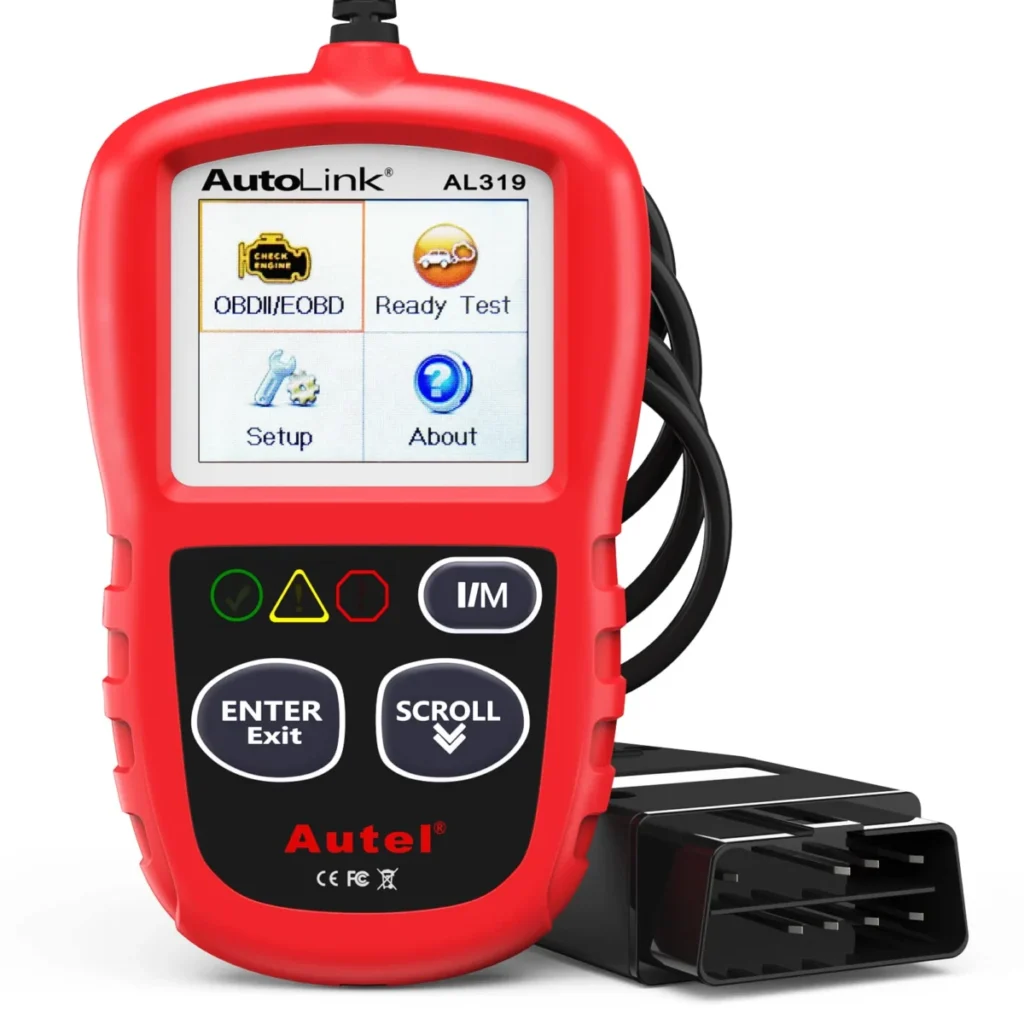
- Why we pick it: It is a wired handheld code reader with no Bluetooth pairing, app permissions or protocol settings to misconfigure, and it covers read/clear codes, freeze frame, live data and I/M readiness on 1996-or-newer OBD-II cars with free lifetime updates.
- Best for: Replacing a reader that fails to link on any car for everyday check engine light work.
- Keep in mind: Engine codes only, so it cannot show ABS, airbag or transmission faults.
As an Amazon Associate we earn from qualifying purchases. This never changes which products we recommend.
Recommended products
Products that fit this
| Product | Best for | Where to buy |
|---|---|---|
| Autel AL319 Code Reader | Replacing a reader that fails to link on any car for everyday check engine light work. | Check price on Amazon |
| ANCEL AD310 Scanner | When the missing data is on ABS, airbag or transmission modules rather than the engine. | Check price on Amazon |
| KONNWEI KW850 Code Reader | Engine-side diagnosis with extra tests such as O2 sensor, EVAP and battery checks. | Check price on Amazon |
Why is my OBD2 scanner not connecting?
The most common cause is the ignition state, followed closely by a connector that is not pushed fully home. An OBD2 scanner needs the car awake: key to ON or the engine running, or on a push-button car two presses of Start without touching the brake. A tool plugged into a car that is fully off may power up from the 12V pin yet never get an answer from the engine control module.
The second most common cause is mechanical. The 16-pin diagnostic link connector (DLC, standard J1962) holds the plug by friction alone, and a plug that is a few millimetres short will light the tool but break the communication pins. Push until it clicks or seats firmly, wiggle it gently, and watch whether the screen changes.
Do those two checks before anything else. They cost two minutes and resolve a large share of link errors, and they tell you whether you are chasing a power fault or a communication fault.
- Turn the ignition to ON or start the engine. On a push-button car, press Start twice without the brake pedal.
- Push the connector fully into the OBD-II port until it seats, then wiggle it slightly.
- Watch the scanner screen or the adapter LED while you do it.
- Retry the connection before changing any settings.
Does the scanner power on? That splits the diagnosis in two
A lit screen or a glowing adapter LED means the port is delivering 12V on pin 16 and ground on pins 4 and 5, so the fault is communication, not power. A dark screen on a handheld, or no LED on a Bluetooth dongle, means the tool is not being powered at all, and the problem sits in the port, the fuse, the cable or the tool itself.
This one observation saves the most time. Communication faults are usually solved with ignition position, protocol settings, pairing or app permissions. Power faults are solved at the car: a blown OBD port fuse (often shared with the cigarette lighter circuit), corroded or pushed-back pins, or a damaged connector.
If the tool is dark, try it on another car before opening the fuse box. A tool that lights up elsewhere is fine and the fault is in the first car's port circuit.
Want to skip the research? The Autel AL319 Code Reader is the model we would start with.
Checklist: fix the connection from easiest to hardest
Work down this list in order and stop as soon as the tool links. Each step is harder or more invasive than the one before, so the order keeps you from pulling fuses for a problem that was a key position.
Steps 1 to 4 solve the majority of cases. Steps 5 to 7 are for tools that stay dark or link intermittently, and step 8 is where a phone-based adapter usually gets fixed.
- Confirm the ignition is ON or the engine is running, and that a push-button car is in accessory or run mode without the brake pressed.
- Reseat the connector at the OBD-II port and check that it is fully inserted.
- Inspect the port pins with a light: look for bent, pushed-back or green-corroded contacts, and never straighten them with a powered probe.
- Check the OBD port or cigarette lighter fuse in the owner's manual fuse chart and replace it if blown.
- Charge or jump the car battery. Low voltage can keep modules asleep or make a tool drop the link mid-session.
- On a Bluetooth adapter, unpair and re-pair in the correct order, and grant the app location and nearby-device permissions on Android.
- On a Wi-Fi adapter, join the adapter's own network, then check the app's protocol setting and any firmware update offered by the app.
- Try the tool on a second car to confirm whether the fault follows the tool or stays with the first vehicle.
Is the fault in the adapter, the app, the phone or the car?
Two swaps narrow the fault to one side of the link: the tool and its app, or the car and its port. If the tool fails on both cars, the tool, its cable or its app is at fault. If it works on the second car, the first car's port, wiring or modules are the problem.
For a Bluetooth or Wi-Fi adapter, the phone is a separate suspect. A dongle that pairs at the operating-system level but never appears inside the app usually has a permission or app-selection problem, not a hardware failure. A dongle that never appears in the phone's Bluetooth list at all points to the adapter or its power.
The car side has its own signature: a tool that links to the engine but reports nothing for ABS, airbag or transmission is not failing to connect, it is connecting to a module set the tool cannot read. That is a tool class limit, covered further down, not a fault to troubleshoot.
Why a Bluetooth or Wi-Fi OBD2 adapter will not pair
Pairing order matters more than most buyers expect. With a classic Bluetooth adapter, pair in the phone's Bluetooth settings first, then open the app and select the adapter there. With a Wi-Fi adapter, join the adapter's own network in Wi-Fi settings, then return to the app; the phone will warn that this network has no internet, which is normal and should be allowed to stay connected.
On Android, apps need location or nearby-device permission to scan for Bluetooth devices, and a denied permission looks exactly like a broken adapter. On iOS, a Wi-Fi adapter is often the smoother route because it does not depend on Bluetooth pairing, but it takes over the phone's data connection while connected.
Protocol selection and firmware are the next layer. Most apps auto-detect the protocol, but a manual setting left on the wrong protocol will produce a link error on a car that is very fine. Cheap ELM327-based adapters with clone chips are a known source of dropped links and partial protocol support, so a dongle that misbehaves across several cars and apps is worth replacing rather than fighting.
When the scanner connects but reads nothing useful
A connection that shows engine data but no ABS, SRS airbag or transmission codes is usually working exactly as designed. A code reader reads powertrain codes from the engine control module; ABS, airbag, body and transmission modules need enhanced, manufacturer-specific support that basic readers do not carry.
Readiness monitors are the other common false alarm. Clearing codes resets the I/M readiness monitors, so a car that just had its light cleared will show "not ready" for a drive cycle or more. That is normal behaviour, not a failed connection, and it also means clearing codes does not make a car emissions-ready.
Freeze frame and live data are the tests that confirm a genuine link. If those populate, the tool is communicating and any missing module is a coverage question, not a cable question.
Cars that need a different tool or adapter
Pre-1996 cars are usually OBD1 and will not talk to an OBD2 tool at all, even with a plug adapter, because the adapter changes the connector, not the protocol. Those cars need an OBD1 adapter cable matched to the make plus a scan tool that supports the older protocol.
Coverage rules explain many "not connecting" reports. OBD-II is mandatory on US cars from 1996 and CAN bus from 2008; EU petrol cars from 2001 and diesel from 2003. Heavy-duty trucks use J1939 and often 24V, which a 12V car tool should not be connected to. Electric and hybrid cars expose limited data over OBD2, and some handheld readers state plainly that they do not support hybrids or EVs.
Make-specific depth is the last factor. Some makes reward a dedicated app, such as FORScan for Ford or a manufacturer-specific tool for BMW, because generic readers cannot reach the modules those apps can. If your car is one of those, choose the tool around the car rather than troubleshooting a reader that was never going to see those modules.
When to stop troubleshooting and see a mechanic
Stop and book a shop when the port has no 12V after a known-good fuse, when several modules are silent on a tool that works on another car, or when the connector or its wiring is visibly damaged. Those point to vehicle wiring or a module fault that no scanner purchase will solve.
Safety warnings are a separate category. Do not keep driving with an ABS, airbag, steering or oil-pressure warning on the dash while you troubleshoot a scanner. A scanner reads and clears codes; it does not repair the fault, and a code points to a circuit or system rather than always to a failed part.
A used-car purchase is the one case where walking away is the right answer. If a seller's car will not communicate on a tool you know works elsewhere, treat that as a reason to have it inspected before money changes hands.
Which scanner or adapter to buy if the tool itself is the problem
Buy only after the two swaps point at the tool. If the same reader fails on two cars while a known-good tool links to both, replacement is justified; if it links on a second car, the money belongs at a shop, not at a checkout.
For a straightforward check engine light on a 1996-or-newer car, a wired handheld code reader removes the pairing, permission and protocol variables entirely, which is exactly the class of fault this guide has been chasing. The Autel AL319 is a wired code reader for engine codes, freeze frame, live data and I/M readiness, with free lifetime updates and seven languages, so it covers the everyday CEL job without an app in the chain.
Its limit is scope: it reads the engine only, so an ABS or airbag light needs a different class of tool.
If you want more engine-side tests in the same wired format, the KONNWEI KW850 adds O2 sensor, EVAP and battery tests and a built-in library of generic code definitions, but it is still an engine-only reader and the manufacturer states it does not work on hybrid or electric cars.
The ANCEL AD310 is the other wired option here, and its published coverage lists ABS, SRS airbag and transmission systems alongside the engine, which matters if your missing data is on a module a basic reader cannot see.
Check the stated vehicle years and protocols against your car before buying any of them.
Avoid these
Common mistakes to avoid
- Blaming the scanner before checking the ignition position and the plug. Turn the key to ON or start the engine, push the connector fully home, and retry before changing any setting or ordering a replacement.
- Troubleshooting a Bluetooth adapter inside the app when it was never paired at the phone level. Pair in the phone's Bluetooth settings first, grant location or nearby-device permission on Android, then select the adapter inside the app.
- Assuming a reader is broken because it shows no ABS or airbag codes. Confirm the tool's stated systems; an engine-only code reader cannot read those modules, so the missing data is a coverage limit, not a connection fault.
- Clearing codes to make a warning light stay off. Repair the fault first; clearing codes resets readiness monitors and the code can return, and it does not make a car pass an emissions test.
- Buying an OBD1-to-OBD2 plug adapter for a pre-1996 car. Use an OBD1 adapter cable matched to the make with a tool that supports the older protocol; a plug adapter does not change the protocol.
Useful tools
Tools that help
As an Amazon Associate we earn from qualifying purchases. This never changes which products we recommend.
Helpful tool
ANCEL AD310 Scanner

- Helps with: When the missing data is on ABS, airbag or transmission modules rather than the engine.
- Why it fits: Its published coverage lists engine, ABS, SRS airbag and transmission systems with CAN, J1850, ISO 9141 and KWP2000 protocols, which addresses the case where a basic reader connects but shows nothing for those modules.
- Keep in mind: Read-only with no service resets, and it needs the OBD-II interface, so pre-1996 OBD1 cars are out even with an adapter.
Helpful tool
KONNWEI KW850 Code Reader

- Helps with: Engine-side diagnosis with extra tests such as O2 sensor, EVAP and battery checks.
- Why it fits: It adds O2 sensor, EVAP and battery tests plus a large built-in generic code library to the usual read/clear, freeze frame and live data set, all in a wired handheld that needs no app.
- Keep in mind: Engine system only, and the manufacturer states it does not work on hybrid or electric cars.
Common questions
Frequently asked questions
Why does my OBD2 scanner turn on but say it cannot communicate?
A powered screen means the port is supplying 12V, so the fault is in the link rather than the power. Check the ignition position, reseat the plug, then confirm the app or tool has the right protocol selected. If it still fails, try the tool on a second car to see whether the fault follows the tool.
How do I check if my OBD2 port has power?
Plug in any known-good tool or adapter and look for a lit screen or LED; that alone confirms 12V on pin 16 and ground on pins 4 and 5. If nothing lights, check the OBD port or cigarette lighter fuse and inspect the pins for damage before suspecting the tool.
Why won't my phone find my Bluetooth OBD2 adapter?
The adapter is usually unpowered, already paired to another device, or blocked by a missing app permission. Confirm the LED is lit with the ignition on, forget the device in Bluetooth settings and pair again, and on Android allow location or nearby-device access for the app.
Can a scanner fail to connect because of a dead car battery?
Yes. Low battery voltage can keep control modules asleep or make a tool drop the link partway through a session, which looks like a communication fault. Charge or jump the car and retry before replacing anything.
Will a code reader show ABS or airbag codes?
A basic engine code reader will not; it reads powertrain codes from the engine control module only. ABS, airbag, body and transmission data require enhanced manufacturer-specific support, so choose a tool whose stated systems include those modules.
Do I need a different adapter for a pre-1996 car?
Yes. A plug adapter alone will not make an OBD2 reader communicate with an OBD1 car.
Next step
Run the two-minute check first: ignition to ON, connector fully seated, and note whether the tool lights up. If it stays dark on a second car too, replace it; the Autel AL319 is the wired engine-code reader to start with for a 1996-or-newer car, while an ABS or airbag fault needs a tool whose stated systems include those modules.
Keep reading
How to Clear a Check Engine Light With an OBD2 Scanner (and When Not To)
A clear, practical answer to how to clear check engine light with obd2 scanner, with the steps, the common mistakes and what…
Free OBD2 Code Reading: What a Store Scan Shows and What It Hides
A free OBD2 code reading gives you engine codes and little else: no ABS, airbag or live data. See what a store…
How Much Does a Scan Tool Cost? Price Tiers by What They Can Read
A clear, practical answer to how much does a scan tool cost, with the steps, the common mistakes and what to do…