Bluetooth OBD2 Adapter vs WiFi OBD2 Adapter: Which Fits Your Phone and Your App
Published October 31, 2026
As an Amazon Associate we earn from qualifying purchases. This never changes which products we recommend.
Choose a Bluetooth OBD2 adapter if you use Android, want the phone to keep its internet, CarPlay and hotspot, and prefer a link that reconnects on its own. Choose a Wi-Fi OBD2 adapter if you use an iPhone with an app that only talks over Wi-Fi, or you want a connection that does not depend on Bluetooth pairing at all.
The single deciding tradeoff in the Bluetooth OBD2 adapter vs WiFi OBD2 adapter question is this: Wi-Fi works almost everywhere but makes the phone join the adapter's own network, while Bluetooth leaves the phone's network alone but depends on the chip generation and the app.
Both types are dongles that plug into the 16-pin OBD-II port (the diagnostic link connector) and hand data to a phone app. Neither has a screen, and neither repairs anything: they read trouble codes, freeze frame, live data (PIDs) and I/M readiness monitors over the CAN bus. What separates them is the radio link, and that link decides which phones they work with, how they reconnect and what happens to your phone's other connections.
Quick verdict
Bluetooth OBD2 adapters suit Android users who want a stable, self-reconnecting link that leaves the phone's internet and CarPlay untouched. Wi-Fi OBD2 adapters suit iPhone owners and anyone whose app expects a Wi-Fi connection, at the cost of the phone's own network while connected.
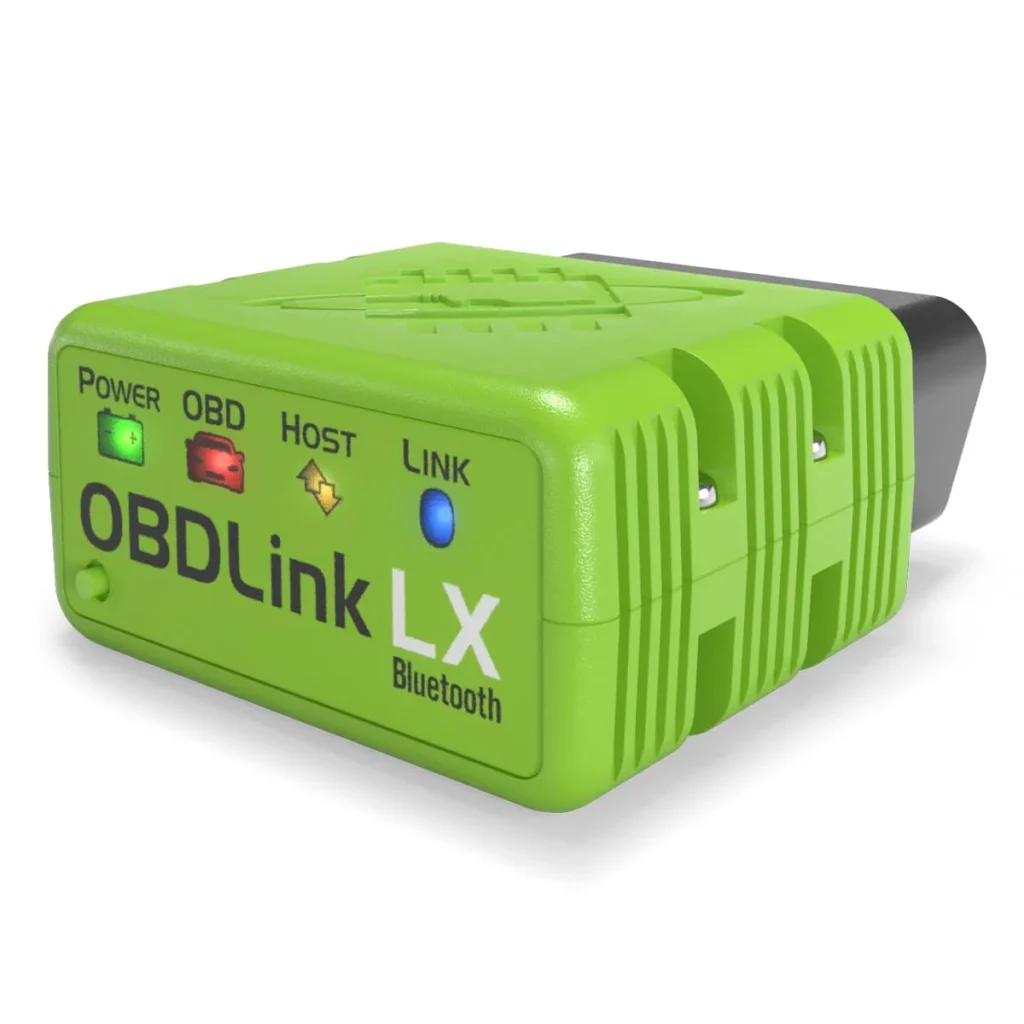
Bluetooth OBD2 Adapter
Pairs once, stays online
Choose a Bluetooth OBD2 adapter if you are on Android (or use a BLE-capable app on iOS) and want the phone to stay online and reconnect without rejoining a network.
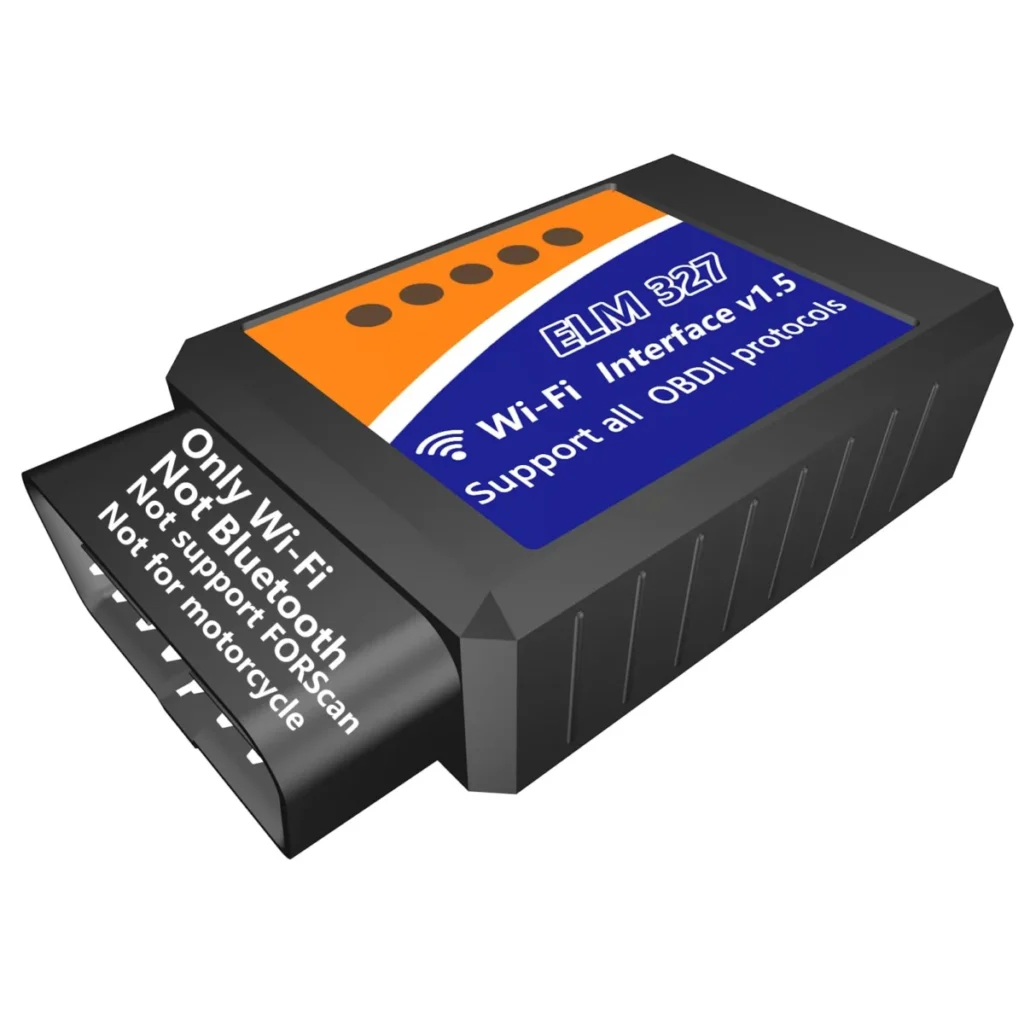
WiFi OBD2 Adapter
Joins a network, cuts internet
Choose a Wi-Fi OBD2 adapter if you use an iPhone with a Wi-Fi-only app, or you want a connection that any phone or tablet can join without pairing.
Key takeaways
- A Wi-Fi OBD2 adapter makes the phone join the adapter's own network, which cuts internet, CarPlay and hotspot for as long as you are connected.
- Bluetooth OBD2 adapters leave the phone's network alone, but iOS support depends on BLE and on whether the app speaks Bluetooth at all.
- Reconnection differs in practice: Bluetooth pairs once and reconnects, while Wi-Fi means rejoining a network each session.
- Throughput is rarely the bottleneck for engine PIDs on either link; chip quality and app settings change the refresh rate more than the radio does.
Table of contents9 sections · tap to expand
What is a Bluetooth OBD2 Adapter?
A Bluetooth OBD2 adapter is a plug-in dongle that sends engine data to a phone or tablet over a Bluetooth link, either classic Bluetooth or Bluetooth Low Energy (BLE), and leaves the phone's Wi-Fi and mobile data free.
What is a WiFi OBD2 Adapter?
A Wi-Fi OBD2 adapter is a plug-in dongle that broadcasts its own ad-hoc Wi-Fi access point, so the phone or tablet joins the adapter's network to read data instead of using Bluetooth.
At a glance
Bluetooth OBD2 Adapter vs WiFi OBD2 Adapter at a glance
| Criterion | Bluetooth OBD2 Adapter | WiFi OBD2 Adapter |
|---|---|---|
| Phone platform support | Android and Windows on the OBDLink LX; iOS only with BLE adapters and a supporting app | iOS and Android both, since any phone can join a Wi-Fi network |
| Connection stability and reconnection | Pairs once, then reconnects automatically when in range | Requires rejoining the adapter's network each session |
| Data throughput for live data and logging | Adequate for engine PIDs and logging; classic Bluetooth is slower than Wi-Fi in theory | Higher raw bandwidth, but engine PID rates rarely need it |
| Effect on phone internet, CarPlay and hotspot | None; mobile data and CarPlay keep working | Internet, CarPlay and hotspot stop while the phone is joined to the adapter's network |
| Setup and pairing complexity | Pair in phone settings, then select the adapter in the app | Join the adapter's Wi-Fi network, then set the app to Wi-Fi |
| App compatibility and settings | ||
| Chip quality (genuine ELM327 vs clone) | Varies by adapter; genuine chips reconnect and log more reliably | Varies by adapter; clones often drop the Wi-Fi link or misreport PIDs |
| Price and total cost of app plus adapter | Adapter cost plus any paid app tier | Adapter cost plus any paid app tier; no extra hardware needed |
Key differences
6 key differences between Bluetooth OBD2 Adapter and WiFi OBD2 Adapter
1. How each adapter type connects to the phone
A Bluetooth OBD2 adapter links over classic Bluetooth or Bluetooth Low Energy, and the phone treats it as a paired device rather than a network. A Wi-Fi OBD2 adapter instead broadcasts an ad-hoc Wi-Fi access point, and the phone joins it the same way it joins a home network. That difference in how the link is made explains almost every other tradeoff on this page.
The practical consequence is what the phone does with its radios. Bluetooth leaves Wi-Fi and mobile data free, so navigation, streaming and CarPlay keep running. Wi-Fi uses the phone's only Wi-Fi radio for the adapter, so anything that depends on that radio stops until you disconnect.
2. iPhone support: Wi-Fi works natively, Bluetooth needs BLE
A Wi-Fi OBD2 adapter works with iPhone out of the box because iOS joins Wi-Fi networks without special permissions. Bluetooth support on iOS is narrower: the adapter must use Bluetooth Low Energy and the app must be written to talk to it, which is why many classic Bluetooth adapters are sold as Android-only. The OBDLink LX is an example of that limit, since it is listed for Android and Windows and not for Apple iOS devices.
For an iPhone owner, the safe assumption is that a Wi-Fi adapter will connect and a Bluetooth one might not. Check the app's own compatibility list before buying a BLE adapter for iOS, because the chip and the app both have to support the link.
3. The Wi-Fi network trade-off: what you lose while connected
While a Wi-Fi OBD2 adapter is connected, the phone's Wi-Fi is occupied by the adapter's network, so the phone has no internet unless it falls back to mobile data. On many phones that fallback does not happen automatically, and CarPlay and personal hotspot stop working because both rely on the Wi-Fi radio. A Wi-Fi adapter therefore suits a scan session, not a permanent always-on setup.
A Bluetooth adapter avoids the problem entirely: the phone stays on its normal network and the adapter runs alongside it. If you want live data on a dash-mounted phone while navigation runs, Bluetooth is the link that allows both at once.
4. Stability and reconnection: pairing once versus rejoining a network
Bluetooth is paired once and then reconnects by itself whenever the adapter is powered and in range, which makes it the calmer choice for repeated short sessions. Wi-Fi means selecting the adapter's network each time you start, and some phones warn that the network has no internet or quietly switch back to another network mid-session.
Neither link is immune to dropouts. A loose fit in the OBD-II port, dirty pins or a blown OBD port fuse will break both, and a clone chip can drop either link under load. The difference is recovery effort: Bluetooth usually reconnects on its own, while Wi-Fi often needs the network reselected.
5. Speed and throughput: what the radio actually changes
Wi-Fi has more raw bandwidth than classic Bluetooth, but engine live data is limited by how fast the ECU answers PID requests, not by the radio. In practice both links refresh live data at a usable rate for graphing and freeze frame review, and the app's polling settings and the chip quality matter more than the radio type. A genuine ELM327 chip handles rapid requests and logging better than a clone.
Where throughput shows up is long logging sessions and multi-PID dashboards. A Wi-Fi adapter has more headroom there, but a well-made Bluetooth adapter with a genuine chip still logs engine data reliably. Neither link turns a read-only adapter into a bidirectional scan tool.
6. Apps, settings and chip quality
App choice follows the link. Torque is commonly used on Android with either adapter, and each app has a connection setting you must match to the adapter type.
Chip quality decides reliability more than the radio does. Genuine ELM327 chips handle reconnection and PID requests consistently, while clone chips are a common cause of failed connections and garbled data. Buy from a seller that names the chip, and treat unusually cheap adapters with suspicion.
Bluetooth OBD2 Adapter: strengths and limitations
A Bluetooth OBD2 adapter pairs once and leaves the phone's Wi-Fi, mobile data and CarPlay free, which suits Android users and anyone who wants live data alongside navigation. Its limit is iOS support: many classic Bluetooth adapters, including the OBDLink LX, are Android and Windows only.
Strengths
- Keeps the phone's internet, CarPlay and hotspot working while connected
- Reconnects automatically after the first pairing
- Leaves the Wi-Fi radio free for other uses
Limitations
- iOS support depends on BLE and on the app, so many adapters are Android-only
- Classic Bluetooth has less raw bandwidth than Wi-Fi
- Clone chips cause dropouts regardless of the radio
OBDLink LX Bluetooth Adapter
A Bluetooth OBD2 adapter for Android and Windows that includes the OBDLink app and OBDwiz software, with lifetime firmware updates and a stated three-year guarantee. It is explicitly not compatible with Apple iOS devices, so it represents the Android-first side of Bluetooth.
WiFi OBD2 Adapter: strengths and limitations
A Wi-Fi OBD2 adapter works with iPhone and Android alike because any phone can join its network, and it has more raw bandwidth for long logging. The cost is the phone's own Wi-Fi: internet, CarPlay and hotspot stop while connected, and you rejoin the network each session.
Strengths
- Works natively on iPhone and iPad without BLE requirements
- Same adapter serves iOS and Android households
- More raw bandwidth for long logging sessions
- No Bluetooth pairing step to manage
Limitations
- Phone loses internet, CarPlay and hotspot while joined
- Requires rejoining the adapter's network each session
- Some apps do not support Wi-Fi adapters
MOCATEC WiFi ELM327 Adapter
It reads freeze frame, live data and I/M readiness, and the seller states it does not support motorcycles.
Decision guide
Which should you choose?
| If you… | Choose | Why |
|---|---|---|
| iPhone owner who wants a cheap adapter for a check engine light and live data | WiFi OBD2 Adapter | Wi-Fi works natively on iOS, while many Bluetooth adapters are Android-only. |
| Android user who wants continuous logging or a permanent dash-mounted adapter | Bluetooth OBD2 Adapter | Bluetooth reconnects on its own and keeps the phone's data connection for uploads. |
| DIY mechanic graphing live data and freeze frame on a tablet | Either | Both stream PIDs; pick the link your app supports best and a genuine ELM327 chip. |
| Used-car buyer doing a quick pre-purchase code scan with a phone | Either | A single scan needs no long connection; use whichever adapter your phone pairs with fastest. |
| Driver who wants the phone to keep internet and navigation while the adapter is plugged in | Bluetooth OBD2 Adapter | A Wi-Fi adapter takes over the phone's Wi-Fi, cutting internet, CarPlay and hotspot. |
Choose Bluetooth OBD2 Adapter if
- You use Android and want the phone to keep mobile data and navigation while the adapter is plugged in.
- You want a permanent dash-mounted adapter that reconnects without you reselecting a network.
- You run CarPlay or a hotspot and cannot give up the phone's Wi-Fi radio during a scan.
- You want continuous logging with automatic reconnection between sessions.
Choose WiFi OBD2 Adapter if
- You use an iPhone and want an adapter that connects without checking BLE compatibility.
- Your app of choice is set up for Wi-Fi and you scan in short sessions rather than continuously.
- You share one adapter between iOS and Android phones in the same household.
- You want the extra bandwidth for long live-data logging sessions.
See also: Bluetooth vs Wired OBD2 Scanner: Which Fits Your Phone, Car and Repair Job.
Common questions
Frequently asked questions
Does a Wi-Fi OBD2 adapter work with iPhone?
Yes. A Wi-Fi OBD2 adapter works with iPhone because iOS joins the adapter's Wi-Fi network like any other, so no Bluetooth Low Energy support is needed.
Will a Bluetooth OBD2 adapter disconnect my phone's internet?
No. A Bluetooth OBD2 adapter uses the Bluetooth radio, so mobile data and Wi-Fi stay free and the phone keeps its internet connection. That is the main practical advantage of Bluetooth for drivers who want navigation running during a scan.
Why does my Wi-Fi OBD2 adapter stop my phone from going online?
The adapter broadcasts its own ad-hoc Wi-Fi network, and the phone can only use one Wi-Fi network at a time. While joined, the phone has no internet unless it falls back to mobile data, and CarPlay and hotspot stop working because they need the Wi-Fi radio.
Which is faster for live data, Bluetooth or Wi-Fi?
Wi-Fi has more raw bandwidth, but engine live data is limited by how fast the ECU answers PID requests, so both links refresh at a usable rate. Chip quality and the app's polling settings change the refresh rate more than the radio type does.
Can I use a Bluetooth OBD2 adapter with CarPlay?
Yes, in the sense that a Bluetooth adapter does not interfere with CarPlay, because CarPlay uses Wi-Fi or USB and the adapter uses Bluetooth. A Wi-Fi adapter is the one that conflicts, since it occupies the phone's Wi-Fi radio.
Why won't my OBD2 adapter connect to my phone?
The most common causes are the wrong connection type selected in the app, an unpaired Bluetooth adapter, or a Wi-Fi adapter whose network was not joined. Check the ignition is on, the dongle is seated in the OBD-II port, and the OBD port fuse is intact before suspecting the adapter.
Bottom line
The verdict
There is no universal winner between these two links, only a fit. Choose a Bluetooth OBD2 adapter when you are on Android, want the phone to stay online with CarPlay and navigation running, and value automatic reconnection over raw bandwidth. Choose a Wi-Fi OBD2 adapter when you are on iPhone, want a connection that any phone can join, and can accept losing the phone's internet and hotspot during a scan session.
If you are unsure, decide by phone first: an iPhone points to Wi-Fi unless you have confirmed a BLE adapter and app pairing, and an Android phone points to Bluetooth for everyday use. Then check the app's connection setting and buy an adapter with a genuine ELM327 chip, because that choice affects reliability more than the radio does. The OBDLink LX Bluetooth Adapter is the Android-first pick, while the MOCATEC WiFi ELM327 Adapter is the Wi-Fi pick for iPhone and Android households.
Keep reading
OBD1 vs OBD2 Scanner: Which One Your Car Needs and What to Buy
Pre-1996 cars need brand-specific OBD1 cables and code schemes; 1996-and-newer cars use one OBD2 port. Learn what each tool reads and which…

ANCEL vs Autel: Match the Scanner Tier to the Fault You Need to Read
Pair each ANCEL class with the closest Autel class: systems read, update costs, screens and languages, plus when neither entry model does…

Code Reader vs OBD2 Scanner: Where the Line Falls at Live Data and ABS
Code Reader vs OBD2 Scanner compared on where the line falls: powertrain codes versus other modules and live data, with clear guidance…